Packing slips with real customization power
Retailer-compliant templates for Macy's, Home Depot, and Lowe's out of the box. Plus a drag-and-drop builder and full HTML/Liquid editor for when you need complete control over logos, images, and layout. Configure document generation alongside your automation rules, using order data from the stores you connect through integrations.
Two problems, one solution
Recurring packing slip work to check:
- Confirming each retailer's current document requirements
- Preparing the right product images and layout for each template
- Maintaining different templates for different retail customers
- Reviewing the output before printing
- Checking whether your existing ShipStation templates already solve the task
ShipExtension gives you both:
- Pre-built templates verified against actual retailer specifications
- Drag-and-drop builder for custom layouts with your logos and images
- Full HTML/Liquid editor when you need pixel-perfect control
- Populated from ShipStation order data and generated as a PDF
Supported Retailers
Templates built from real requirements
Macy's & Bloomingdale's
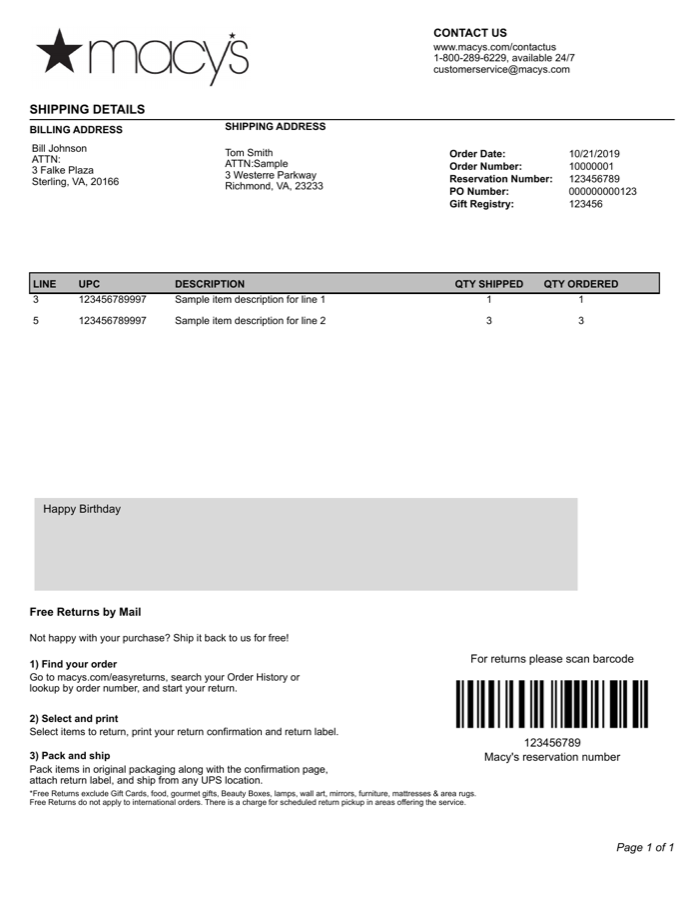
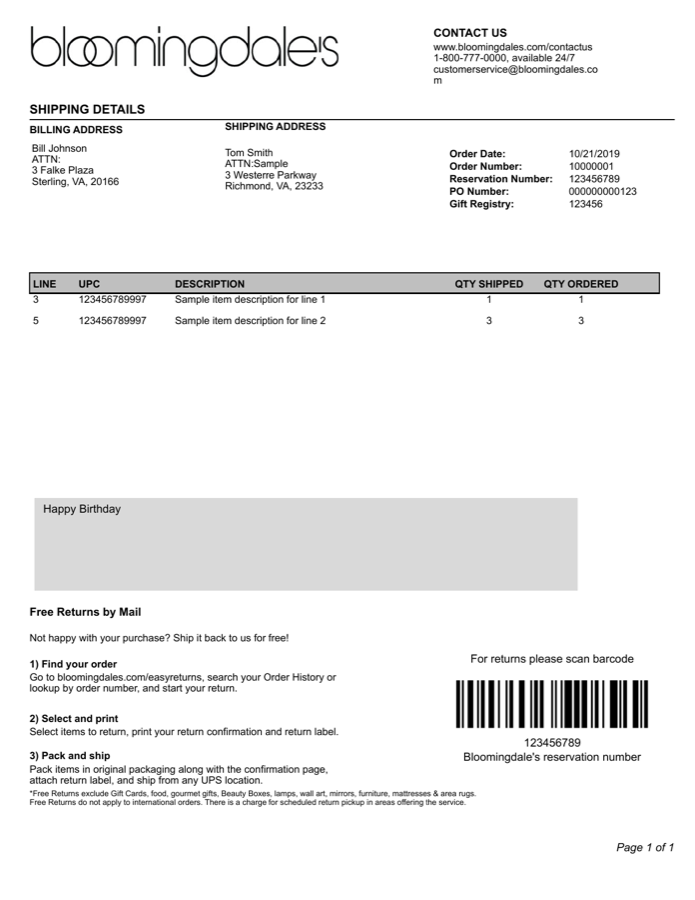
Full compliance with Macy's and Bloomingdale's drop-ship vendor requirements. Proper PO formatting, item sequencing, barcode placement, and return instructions. Automatically switches branding based on the sales division.
- Code128 barcode for returns
- Gift message support
- Multi-page pagination
Home Depot
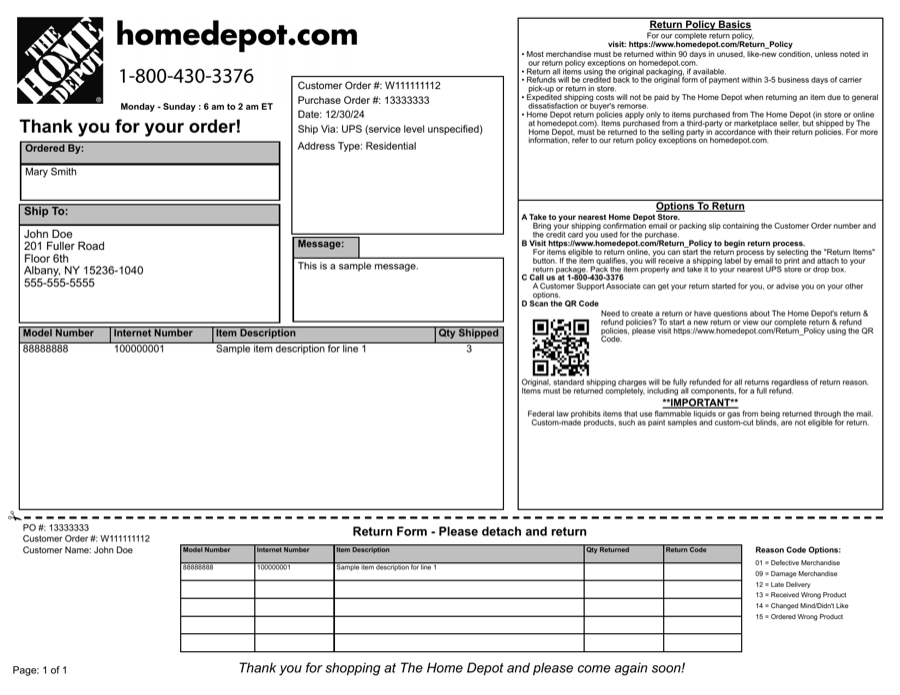
Landscape layout matching Home Depot's exact packing slip specification. Includes QR code for returns, barcode placement, and return form tear-off section. Supports both standard and palletized order formats.
- PO barcode and QR code
- Return form with tear-off
- Standard + palletized variants
Lowe's
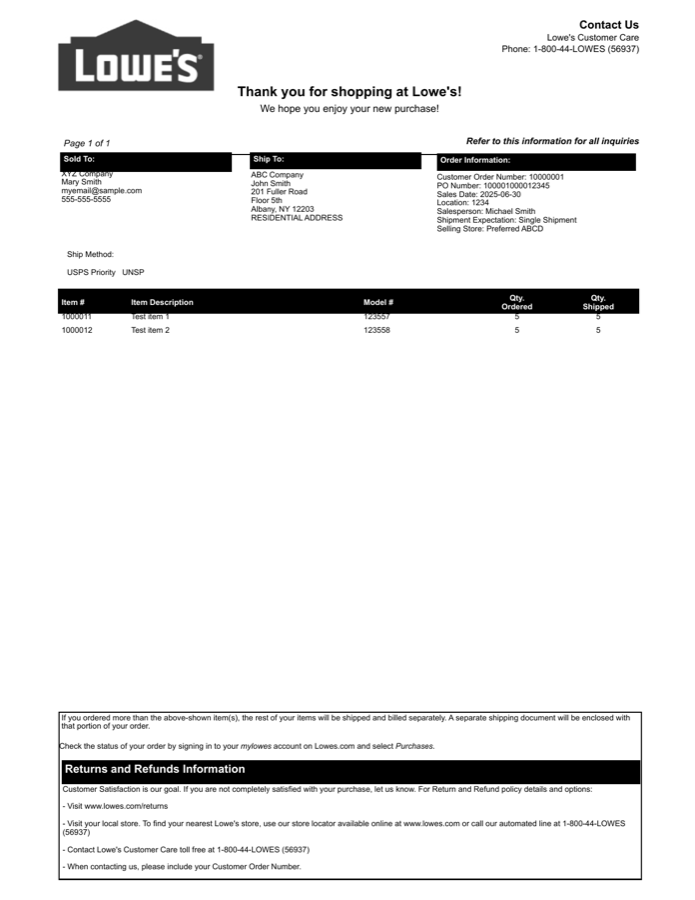
Lowe's-specific formatting with their required header structure, black header styling, and item detail layout. Includes returns and refund information section with contact details.
- Lowe's required header layout
- Returns information section
- LFK single-shipment support
Custom Templates
Build exactly what you need
Two ways to create custom packing slips — no matter how specific your requirements.
Visual Builder
Arrange rows, columns, and blocks visually. Add your logo, shipping addresses, item tables, dividers, and custom text. No code required.
- Logo and image blocks
- Configurable item tables with product photos
- Multiple paper sizes — Letter, A4, A6, 4x6
- Starter templates to get going fast
HTML + Liquid Templates
Full control with HTML, CSS, and Liquid variables. Access every order field and render pixel-perfect output.
- Full HTML and CSS control
- Every order field available as a variable
- Product image URLs for visual packing slips
- Gift messages, customer notes, and more
Both template types render to PDF and print perfectly on any paper size.
How It Works
Compliant packing slips in three steps
Pick a template
Choose a retailer-compliant template — Macy's, Home Depot, Lowe's — or build your own in the drag-and-drop editor.
Map your orders
ShipExtension reads your ShipStation orders and fills each slip with the right order, item, and store details.
Print compliant PDFs
Print-ready packing slips generate automatically, matched to the right order. No manual PDF editing.
FAQ
ShipStation packing slips FAQ
- Does ShipStation have custom packing slip templates?
- Check your existing ShipStation templates first. ShipExtension offers retailer-specific templates, a drag-and-drop builder and an HTML/Liquid editor; inspect a representative PDF against the retailer requirements.
- What are Home Depot packing slip requirements?
- Home Depot dropship orders require a packing slip that follows Home Depot's exact layout and order details rather than a generic slip. ShipExtension's Home Depot template is built to match those requirements, so compliant slips are produced automatically instead of being hand-built in HTML.
- Which retailer packing slips are supported?
- ShipExtension ships compliant templates for Macy's and Bloomingdale's, Home Depot, and Lowe's, with more retailers available. Each is generated automatically from your ShipStation orders, so the right template is applied to the right order.
- Can I design my own packing slip?
- Yes. Use the visual drag-and-drop builder for a no-code custom template, or drop into full HTML and Liquid templates when you need pixel-perfect control — including adding your own logo and branding.
- How do the packing slips get generated?
- Select orders or a supported batch, choose a template or configured store mapping, and generate a PDF. Inspect it before printing.
Start building packing slips that actually work
Retailer-compliant templates out of the box. Custom builder and HTML editor when you need more. Packing slips are a $99/month add-on (also available standalone for up to 1,000 orders/month). The 14-day app trial does not include packing-slip access.
Your first workflow
Technical details
- The recurring task
- Staff prepare different packing slips for different retail customers. Generate retailer-specific PDFs from ShipStation orders and configured templates.
- Representative input and result
- Select an order and the appropriate retailer template, then generate a slips-only PDF for inspection. Existing template previews below show the document layouts.
- Information needed
- Retailer requirements, order item data, template selection and store mapping where used. Custom templates may need logos, product images and additional order fields.
- Verification and limitations
- Inspect the downloaded PDF for layout, item quantities and retailer requirements before printing. Generation errors are shown in the batch result. A template is not a guarantee of acceptance by a retailer.
- ShipStation API scope
- Order selection reads V1 orders. Open batches and batch shipments use V2. Slips-only output does not purchase labels. Other output modes can purchase labels and require explicit confirmation; use slips-only for a safe document preview.
- Subscription and setup
- Packing Slips: $99/month standalone (1,000 orders), or a $99/month add-on using the parent plan's limit. Automate plus slips: $278/month; Optimize plus slips: $598/month. Initial setup help is available; custom implementation scope is confirmed separately.
Total processing includes fetching orders and any API operations. Time varies with batch size, actions and API pacing; no fixed completion time is guaranteed.